
The Plan page shows the plan your business is on, how much of it you use, and the plans you can choose from. Owners and managers can open it; only the owner can pay.
See what you use
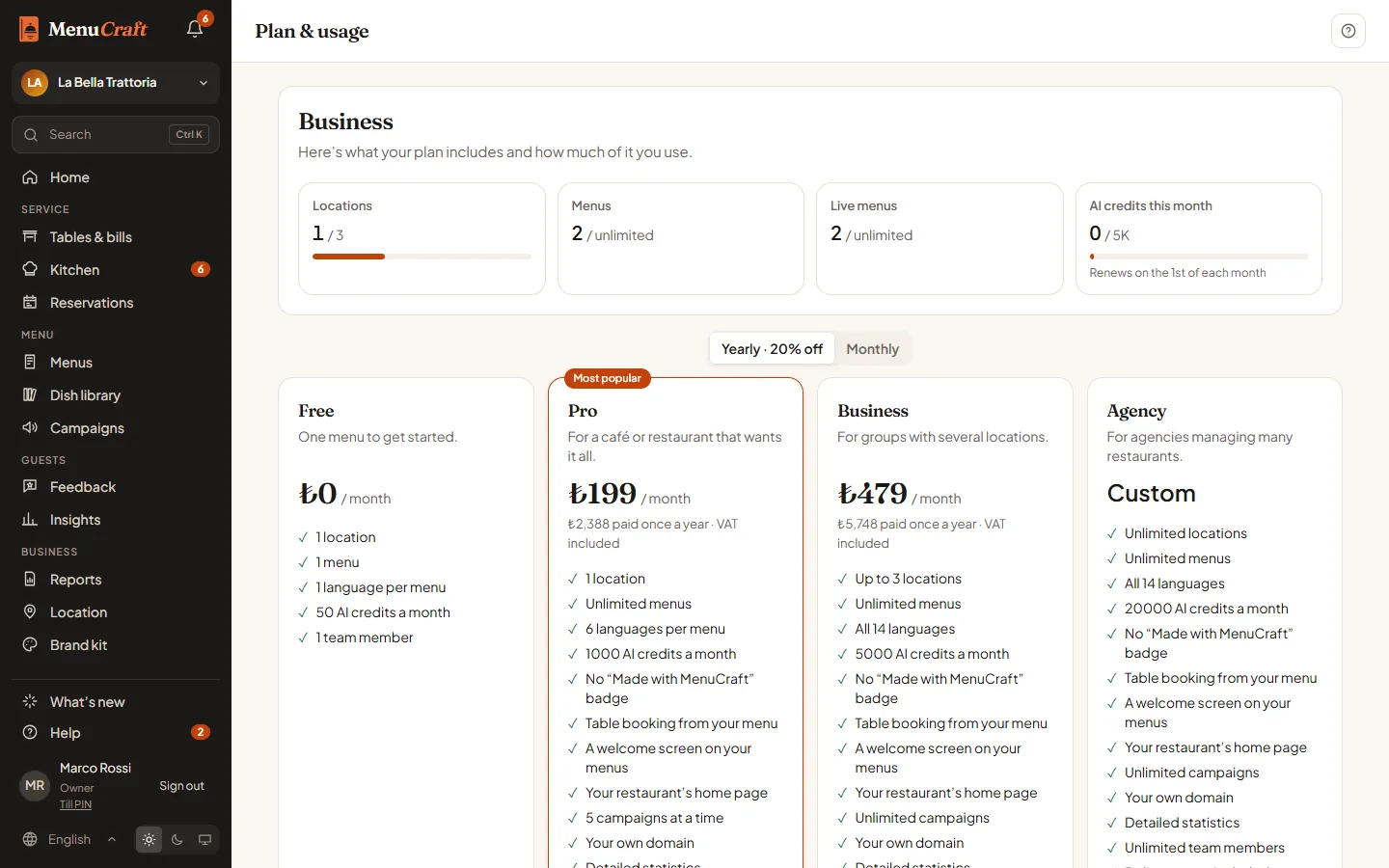
At the top of Plan & usage you see your plan's name and four meters:
- Locations: how many restaurants you have, out of how many your plan allows.
- Menus: how many menus you have.
- Live menus: how many of them are published.
- AI credits this month: credits used so far this month. They renew on the 1st of each month.
A full bar means you have reached the limit. If you try to go past it, for example with a second menu on Free, MenuCraft tells you Your plan’s limit is reached and offers See plans.
During a free trial the badge shows how many days are left, and the sidebar shows them next to Plan. When the trial ends your account moves to Free unless you choose a plan. Nothing is deleted either way.
Compare the plans
Each card lists what a plan includes:
- Free: one menu to get started, in 2 languages.
- Pro: unlimited menus for one location, more languages and AI credits, no "Made with MenuCraft" badge and table booking from your menu.
- Business: several locations, all 14 languages and more AI credits.
- Agency: for agencies managing many restaurants, with a custom price.
Prices are shown per month, in your location's currency when the plan has one. Above the cards, choose Yearly or Monthly: paying for a year at once is 20% off, and each card shows what the year costs. Prices in Turkish lira include KDV (VAT).
Understand AI credits
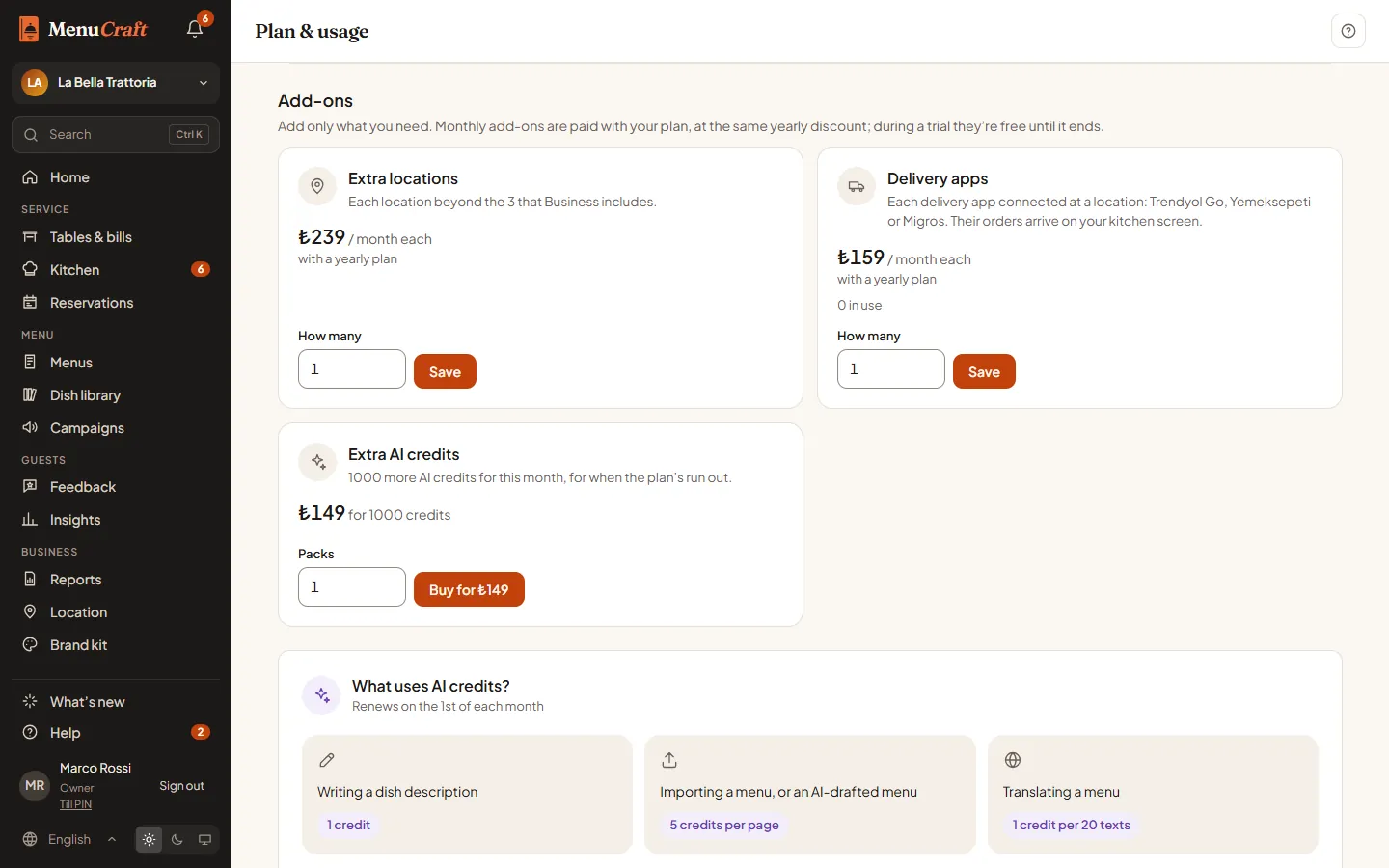
AI credits pay for the work AI does for you. What uses AI credits? at the bottom of the page lists them:
- writing a dish description: 1 credit;
- importing a menu, or having AI draft a menu: 5 credits per page;
- translating a menu: 1 credit per 20 texts.
When the month's credits run out, AI actions wait until the 1st of the next month, or until you move to a plan with more.
Change or pay for your plan
- On the plan you want, select its button, such as Choose Pro (for Agency, Contact us).
- Choose 1 month or 12 months. Twelve months are 20% off.
- Select the pay button, which shows the total. You enter your card on our payment provider's secure page; MenuCraft never sees your card number.
Your plan starts as soon as the payment goes through, and runs until the end of the paid period. We remind you a week before it ends. To pay ahead for the plan you're on, select Pay for the next period on its card: the time is added after your paid period.
Note: If online payment isn't available yet, choosing a plan sends a request instead (Send request). Our team activates it, usually within one working day; meanwhile your current plan keeps running.
Add to your plan
Below the plans, Add-ons lists what you can add to the plan you're on:
- Extra locations: each location beyond the 3 that Business includes.
- Delivery apps: each delivery app connected at a location (Trendyol Go, Yemeksepeti or Migros). An app that doesn't fit the plan any more is paused, not deleted.
- Extra AI credits: a pack of credits for this month, for when the plan's run out.
Monthly add-ons are paid with your plan, at the same yearly discount, and the pay button's total includes them. During a trial they're free until it ends. Adding more during a paid period costs the rest of that period at once; fewer takes effect straight away, without a refund. Only the owner can change add-ons.
Download your data or delete the business
Below the plans, the owner can:
- Download my data: everything MenuCraft keeps for your business, in one file.
- Delete this business: deletes all menus, locations, images, bookings and statistics for the whole team. Menu links and printed QR codes stop working. This can't be undone, so download your data first.