
Table ordering · Kitchen screen
Guests order from the table. Your kitchen sees it at once.
During a busy rush, guests shouldn't have to wave across the room to add a drink or ask for the bill. With MenuCraft's signed table QR codes, guests send orders, waiter calls, and bill requests straight from your menu to your kitchen screen—with zero per-order commission.
- Signed per-table QR codes so every order arrives tagged with the right table
- One-tap waiter call and bill request alerts for your floor staff
- Browser-based kitchen display screen (KDS) and counter pickup board on any tablet or TV
No credit card · No setup fee · No hardware · Cancel any time
Built for service
Zero-commission table ordering on the devices you already own.
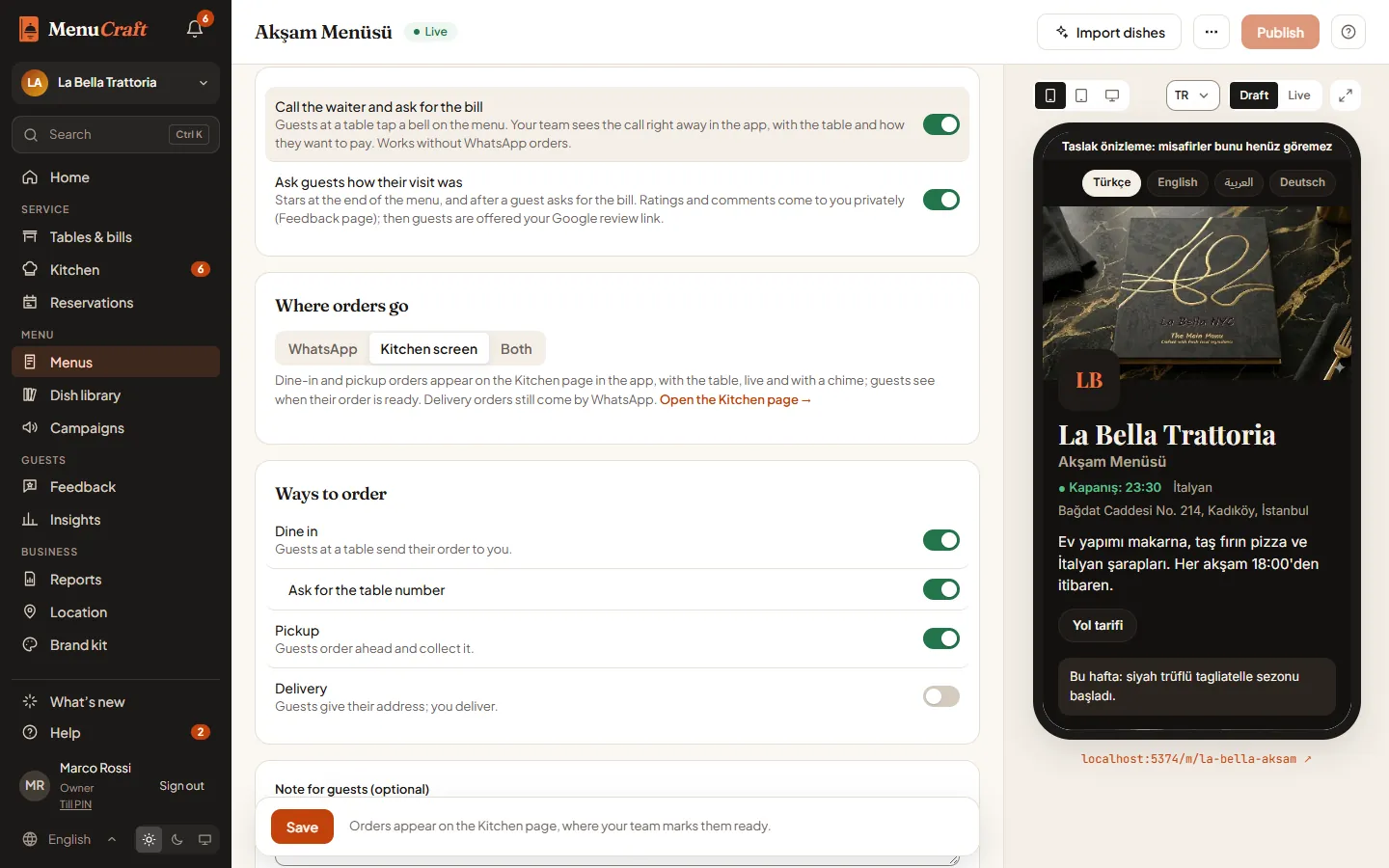
Turn ordering on or off whenever you like—no proprietary terminals and no cut taken from your sales.
| What matters | Paper slips / commission apps | MenuCraft table ordering |
|---|---|---|
| Commission fees | Third-party ordering apps taking a cut of every ticket | 0% commission on every plan; guests pay you directly |
| Table verification | Guests typing wrong table numbers or prank orders from outside | Cryptographically signed table QR codes plus optional GPS distance verification |
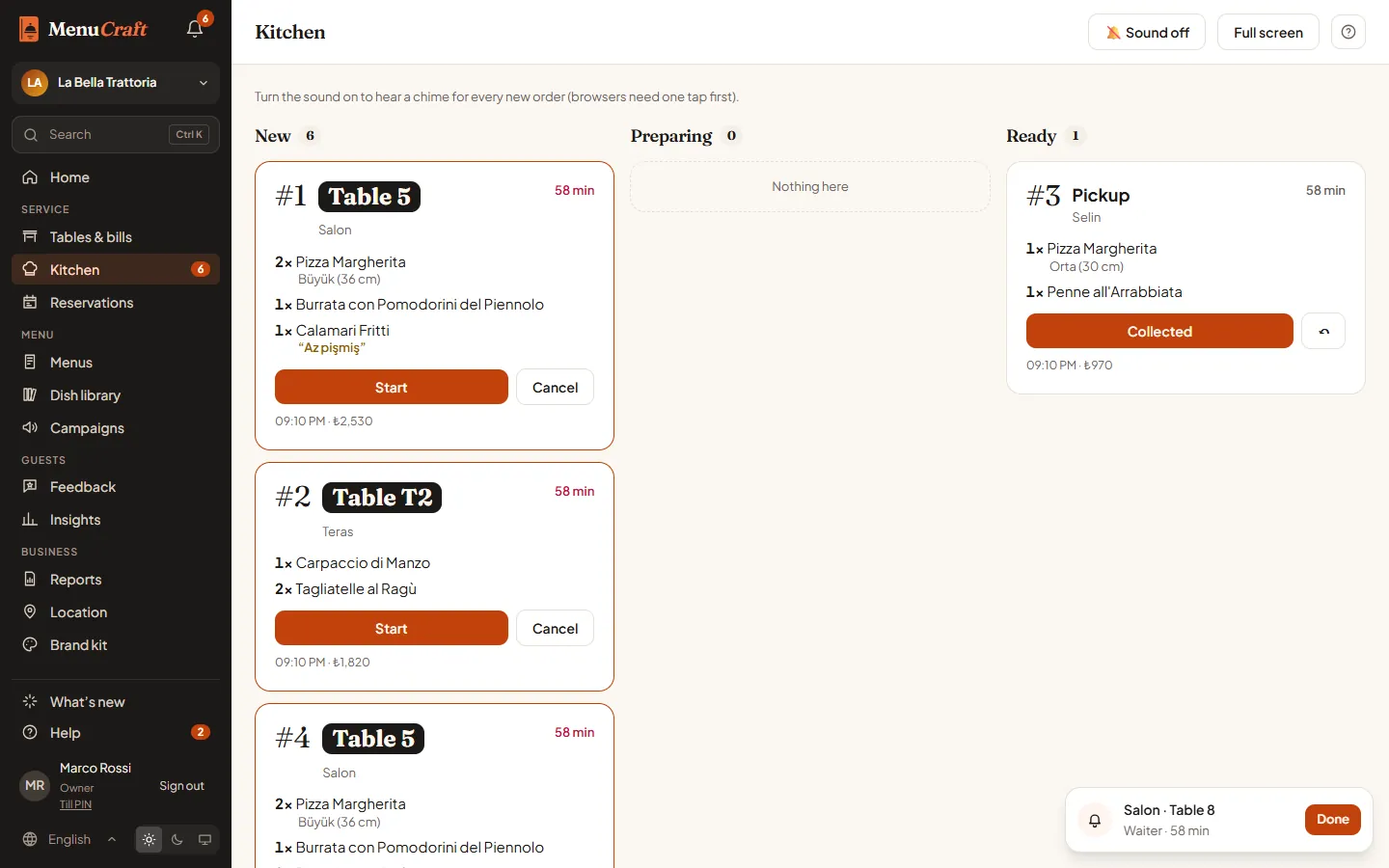
| Kitchen workflow | Handwritten slips lost on the pass | Live Kitchen Screen with New, Preparing, and Ready columns and audio chimes |
| Waiter & bill calls | Guests waiting to catch a server's eye | One-tap 'Call waiter' and 'Ask for bill' buttons notify your team immediately |
| Flexible modes | Locked into one service model | Support dine-in table service, counter pickup with a TV number board, or WhatsApp orders |
Floor to kitchen
Run a live kitchen screen or receive orders on WhatsApp.
Pair a tablet in the kitchen in 60 seconds, or route incoming orders to your shop's WhatsApp number—or both.
- Sizes, add-ons, and guest notes show clearly on every kitchen ticket
- Counter pickup board (/tv/{code}) calls out ready order numbers on any TV and updates the guest's phone
- Paired kitchen tablets stay signed in all evening without sharing owner passwords
- Combine with Table Bills (adisyon) so guest QR orders and waiter orders merge onto one open table tab
Solutions and comparisons
MenuCraft for every kind of hospitality.
MenuCraft vs PDF Menus
Why replace a static PDF QR menu with a live digital menu? Turn your existing PDF or paper menu into a fast, multilingual MenuCraft QR menu in 60 seconds.
Explore For cafés & bakeriesQR Menus for Cafés & Bakeries
Beautiful QR menus for cafés, coffee shops, and bakeries: drink sizes, milk and syrup add-ons, instant pastry sell-outs, Wi-Fi sharing, and a pickup number board.
Explore For restaurants & bistrosQR Menus & Ordering for Restaurants
Crafted multilingual QR menus for independent restaurants and bistros, with table ordering, waiter calls, kitchen screen, reservations, and table bills.
Explore For hotels & resortsQR Menus for Hotels & Room Service
Digital QR menus in 14 languages for hotels, resorts, and room service. Manage room service, pool bar, and restaurant menus with room-tagged QR codes.
Explore 14 languages · Right-to-left Arabic14-Language AI Menu Translation
Translate your restaurant or café QR menu into 14 languages—including proper right-to-left Arabic, German, French, Russian, and Chinese—while keeping full editorial control.
Explore Table bills · Shared tillTable Bills (Adisyon) & Shared Till
Run open table bills (adisyon) from table to till: merge guest QR orders and waiter orders on one tab, split bills 2–10 ways, and close the day with a cash count.
Explore Photo to menu · Ready in 60 secondsPhoto & PDF to QR Menu
Turn photos of your printed paper menu, a PDF, or an Excel spreadsheet into a live multilingual QR menu in 60 seconds. Review every dish and allergen before publishing.
Explore Transparent menus · Allergens & nutritionAllergens, Calories & Transparent Menus
Display all 14 standard food allergens, ingredients, calories (kcal), prep times, and interactive Vegan, Gluten-Free, and Halal filters across 14 languages.
Explore Kitchen screen (KDS) · Pickup boardKitchen Screen (KDS) & Order Board
Replace paper tickets with a live browser-based Kitchen Display System (KDS) and a TV pickup order board. Included on every MenuCraft plan, even Free.
Explore Regulatory compliance · Transparent menusTurkish Menu Regulation & Price List Compliance
Full compliance with Turkey's Ministry of Trade Price Label and Ministry of Agriculture Food Labelling regulations: 14 allergens, ingredients, calories, and print-ready price lists.
ExploreQuestions
Frequently asked questions
Can't find your answer here? Look it up in the help center or write to us. Once you've signed up, you can also ask from inside the app.
Does MenuCraft charge a commission on orders?
Zero. MenuCraft never takes a percentage of your orders and never sits in the middle of your payments.
Do I need special hardware for the kitchen screen?
No. Any iPad, Android tablet, laptop, or screen with a web browser can run the kitchen display and pair to your location with a short code.
How do you prevent fake orders from people not at a table?
Table QR codes include a signed cryptographic key and visit timestamp, and you can enable an optional location check so only guests physically at your venue can order.
Can I enable waiter calls without enabling full table ordering?
Yes. Waiter calls/bill requests and dish ordering have separate toggles so you can match your exact style of service.

Have your menu ready tonight.
No credit card, no hardware. Take the photo and leave the rest to MenuCraft.
No credit card · No setup fee · No hardware · Cancel any time