
Table bills · Shared till
From table to till, one open bill. Split and settle in seconds.
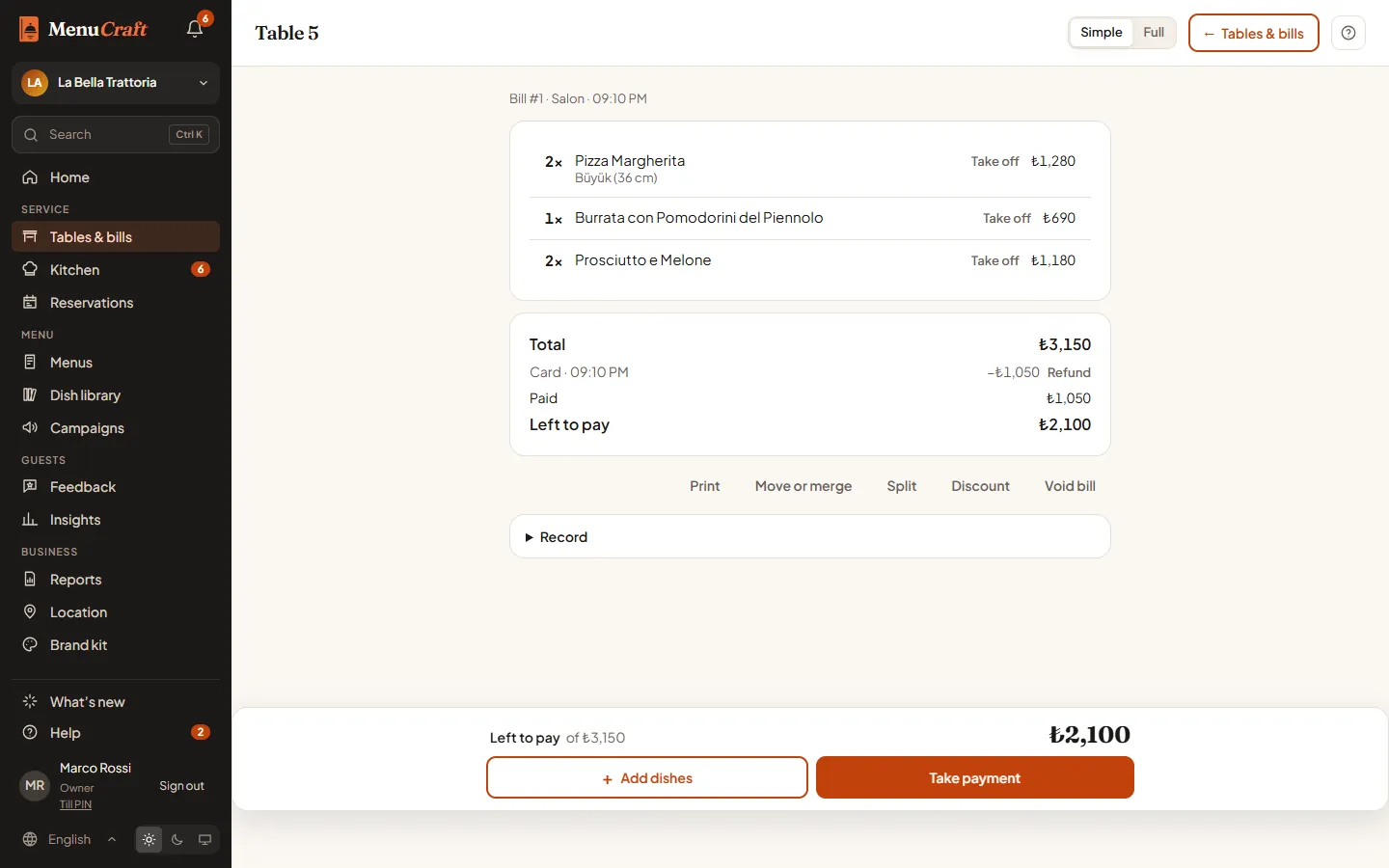
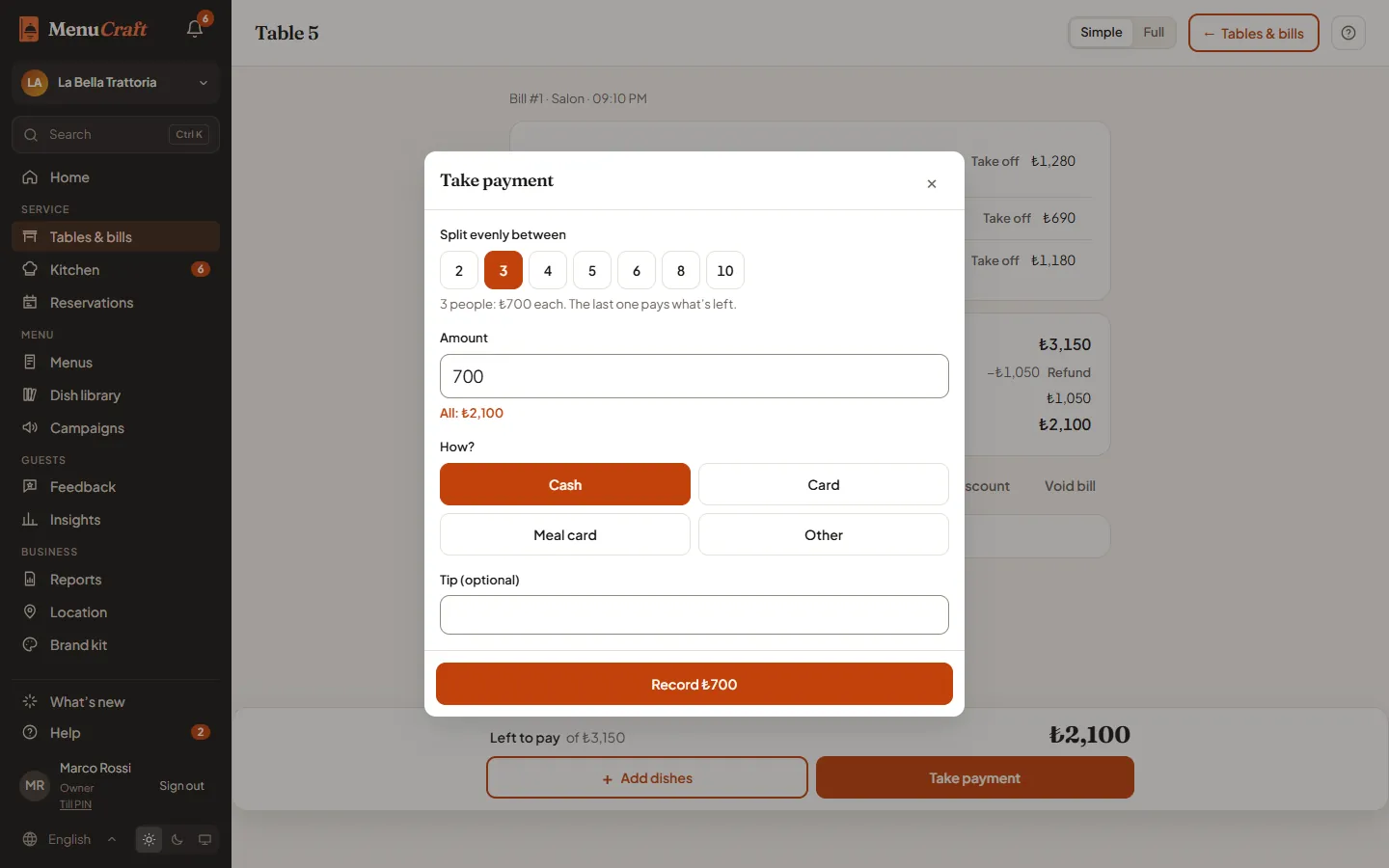
Guest QR orders and waiter orders shouldn't live in two separate worlds. In MenuCraft, every table has one open bill: orders from the floor and from the guest's phone join the same tab and go to the kitchen, split cleanly across 2 to 10 guests at payment time, and reconcile at the end of the night.
- Waiter orders and guest QR orders land on the same open table bill
- Split bills equally between 2 and 10 guests or take partial cash and card payments
- Shared till tablet with staff PIN unlock and manager PIN approval for comps, voids, and discounts
No credit card · No setup fee · No hardware · Cancel any time
Lightweight table bills
Track every open table without a heavy POS lock-in.
A simple per-location add-on that runs on any tablet or laptop alongside your existing fiscal receipt printer or card terminal.
| What matters | Paper tabs / enterprise POS | MenuCraft table bills |
|---|---|---|
| Hardware & contracts | Proprietary terminals, installation fees, and multi-year contracts | Runs in the browser on any iPad, Android tablet, phone, or laptop |
| Menu sync | Maintaining two separate item databases for the till and the QR menu | One menu: dish names, sizes, add-ons, and prices are shared automatically |
| Group bill splitting | Manual calculator math at the counter while a queue forms | One-tap equal split for 2 to 10 guests, or custom partial payments by cash and card |
| Staff accountability | One shared login where nobody knows who voided a dish | Every staff member unlocks the till with their own PIN; discounts and comps require a manager PIN |
| End-of-day closing | Adding up paper slips after midnight | Close the day with sales by payment method, voids, comps, staff breakdown, and cash drawer variance |
Floor & counter
See every open table at a glance and close the night cleanly.
Know which tables are open, who approved every discount or comp, and whether the cash drawer matches.
- Quick counter sale mode for walk-up coffees, pastries, and takeaway orders
- Paired till tablets lock between uses and unlock in a second with a staff member's PIN
- In-place manager PIN prompt so a manager can approve a comp or discount right on the till tablet
- Export daily sales, staff activity, and void/comp reports to CSV for your bookkeeper
Solutions and comparisons
MenuCraft for every kind of hospitality.
MenuCraft vs PDF Menus
Why replace a static PDF QR menu with a live digital menu? Turn your existing PDF or paper menu into a fast, multilingual MenuCraft QR menu in 60 seconds.
Explore For cafés & bakeriesQR Menus for Cafés & Bakeries
Beautiful QR menus for cafés, coffee shops, and bakeries: drink sizes, milk and syrup add-ons, instant pastry sell-outs, Wi-Fi sharing, and a pickup number board.
Explore For restaurants & bistrosQR Menus & Ordering for Restaurants
Crafted multilingual QR menus for independent restaurants and bistros, with table ordering, waiter calls, kitchen screen, reservations, and table bills.
Explore For hotels & resortsQR Menus for Hotels & Room Service
Digital QR menus in 14 languages for hotels, resorts, and room service. Manage room service, pool bar, and restaurant menus with room-tagged QR codes.
Explore 14 languages · Right-to-left Arabic14-Language AI Menu Translation
Translate your restaurant or café QR menu into 14 languages—including proper right-to-left Arabic, German, French, Russian, and Chinese—while keeping full editorial control.
Explore Table ordering · Kitchen screenQR Table Ordering & Kitchen Screen
Let guests order from the table, call a waiter, or ask for the bill via signed QR codes. Orders appear live on your kitchen screen or WhatsApp with 0% commission.
Explore Photo to menu · Ready in 60 secondsPhoto & PDF to QR Menu
Turn photos of your printed paper menu, a PDF, or an Excel spreadsheet into a live multilingual QR menu in 60 seconds. Review every dish and allergen before publishing.
Explore Transparent menus · Allergens & nutritionAllergens, Calories & Transparent Menus
Display all 14 standard food allergens, ingredients, calories (kcal), prep times, and interactive Vegan, Gluten-Free, and Halal filters across 14 languages.
Explore Kitchen screen (KDS) · Pickup boardKitchen Screen (KDS) & Order Board
Replace paper tickets with a live browser-based Kitchen Display System (KDS) and a TV pickup order board. Included on every MenuCraft plan, even Free.
Explore Regulatory compliance · Transparent menusTurkish Menu Regulation & Price List Compliance
Full compliance with Turkey's Ministry of Trade Price Label and Ministry of Agriculture Food Labelling regulations: 14 allergens, ingredients, calories, and print-ready price lists.
ExploreQuestions
Frequently asked questions
Can't find your answer here? Look it up in the help center or write to us. Once you've signed up, you can also ask from inside the app.
Does MenuCraft replace my card terminal or fiscal receipt printer?
No. MenuCraft tracks open table bills, splits, and end-of-day totals, while your existing card reader and fiscal register issue the payment receipt as usual.
Can waiters add dishes from their own phones?
Yes. Waiters can open the tables screen on their phones or use a shared till tablet; every item added or payment taken is recorded under that team member's name.
How does bill splitting work for groups?
When taking payment, you can split the bill equally between 2 and 10 people and record each share as cash or card, or enter any partial amount.
How are voids, comps, and discounts controlled?
You choose which roles can take payments or apply discounts. When a server needs a comp or discount, a manager can type their PIN right on the screen to approve it.

Have your menu ready tonight.
No credit card, no hardware. Take the photo and leave the rest to MenuCraft.
No credit card · No setup fee · No hardware · Cancel any time