
For cafés & bakeries
Drink sizes, oat milk, and warm pastries. A menu that feels like your café.
A café menu moves fast: croissants sell out by ten, seasonal drinks change every month, and every coffee has sizes, milk choices, and extra shots. MenuCraft gives your café a warm, crafted QR menu with drink modifiers, instant sell-outs from your phone, and a counter pickup board.
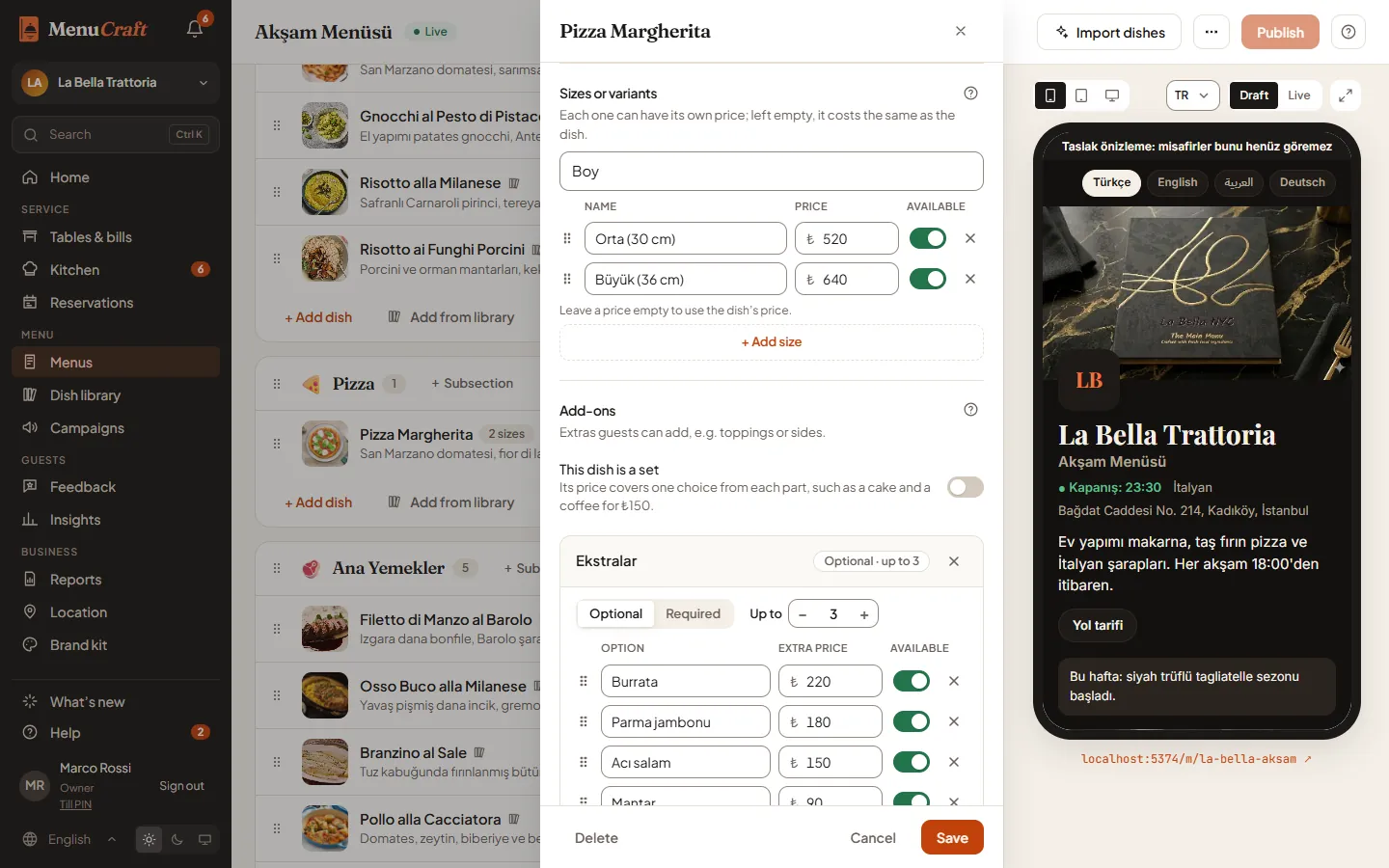
- Drink sizes and milk, syrup, or espresso add-ons on every drink
- Mark sold-out pastries in one tap from your phone behind the counter
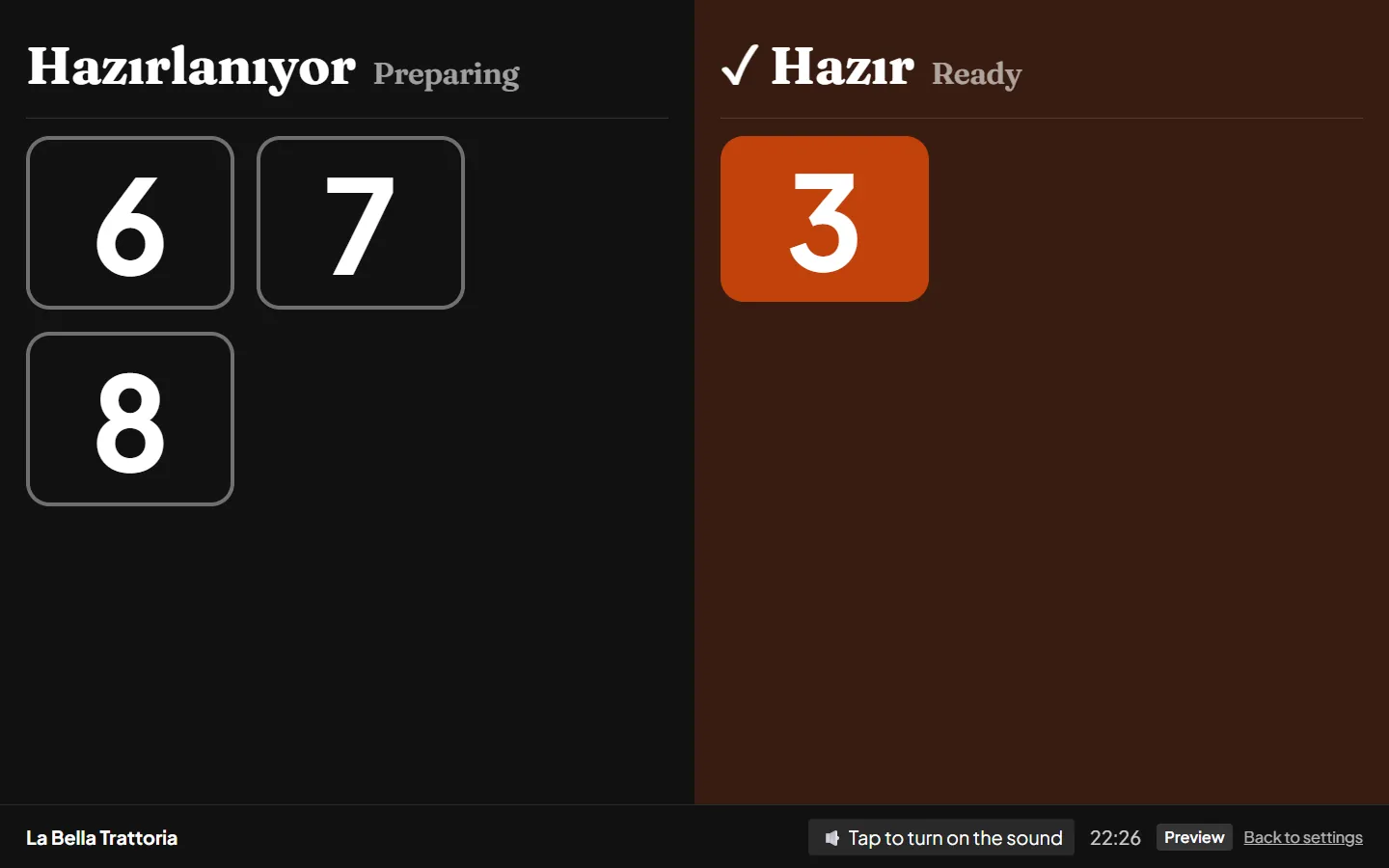
- Counter TV order board showing Preparing and Ready pickup numbers
No credit card · No setup fee · No hardware · Cancel any time
Why MenuCraft for cafés
Built around how a coffee shop or bakery actually runs.
No POS migration, no hardware contracts—just your menu, beautifully served on every guest's phone.
| What matters | Chalkboard / generic QR template | MenuCraft for cafés |
|---|---|---|
| Drink sizes & milk options | Crowded price slashes and tiny notes for alternative milks | Clean Small/Medium/Large size pickers and add-ons (oat milk, extra shot, syrups) with exact prices |
| Daily pastries & specials | Taping over the board or apologising at the till when an item runs out | One tap on your phone marks a pastry sold out on every guest's screen immediately |
| Counter pickup | Baristas shouting names across a busy room | A TV order board shows Preparing and Ready pickup numbers with a chime, and notifies the guest's phone |
| Tourists & expats | Pointing at the pastry case and guessing ingredients | Up to 14 languages with clear dairy, nut, and gluten allergen badges |
| Look & atmosphere | Cold software templates that make every café look identical | Warm Linen and Bakery looks with editorial typography that fits an independent café |
From counter to table
Start with a QR menu, add counter or table ordering when you want it.
Whether guests order at the counter or from their table, MenuCraft keeps your menu, kitchen screen, and pickup board in sync.
- Ready-made Café and Bakery looks with warm paper tones and clear dish photography
- Flexible sizes and add-ons so guests customize drinks without slowing down the queue
- Built-in guest Wi-Fi card at the top of your menu so guests stop asking for the password
- Post-visit feedback that invites happy regulars and visitors to leave a Google review
Solutions and comparisons
MenuCraft for every kind of hospitality.
MenuCraft vs PDF Menus
Why replace a static PDF QR menu with a live digital menu? Turn your existing PDF or paper menu into a fast, multilingual MenuCraft QR menu in 60 seconds.
Explore For restaurants & bistrosQR Menus & Ordering for Restaurants
Crafted multilingual QR menus for independent restaurants and bistros, with table ordering, waiter calls, kitchen screen, reservations, and table bills.
Explore For hotels & resortsQR Menus for Hotels & Room Service
Digital QR menus in 14 languages for hotels, resorts, and room service. Manage room service, pool bar, and restaurant menus with room-tagged QR codes.
Explore 14 languages · Right-to-left Arabic14-Language AI Menu Translation
Translate your restaurant or café QR menu into 14 languages—including proper right-to-left Arabic, German, French, Russian, and Chinese—while keeping full editorial control.
Explore Table ordering · Kitchen screenQR Table Ordering & Kitchen Screen
Let guests order from the table, call a waiter, or ask for the bill via signed QR codes. Orders appear live on your kitchen screen or WhatsApp with 0% commission.
Explore Table bills · Shared tillTable Bills (Adisyon) & Shared Till
Run open table bills (adisyon) from table to till: merge guest QR orders and waiter orders on one tab, split bills 2–10 ways, and close the day with a cash count.
Explore Photo to menu · Ready in 60 secondsPhoto & PDF to QR Menu
Turn photos of your printed paper menu, a PDF, or an Excel spreadsheet into a live multilingual QR menu in 60 seconds. Review every dish and allergen before publishing.
Explore Transparent menus · Allergens & nutritionAllergens, Calories & Transparent Menus
Display all 14 standard food allergens, ingredients, calories (kcal), prep times, and interactive Vegan, Gluten-Free, and Halal filters across 14 languages.
Explore Kitchen screen (KDS) · Pickup boardKitchen Screen (KDS) & Order Board
Replace paper tickets with a live browser-based Kitchen Display System (KDS) and a TV pickup order board. Included on every MenuCraft plan, even Free.
Explore Regulatory compliance · Transparent menusTurkish Menu Regulation & Price List Compliance
Full compliance with Turkey's Ministry of Trade Price Label and Ministry of Agriculture Food Labelling regulations: 14 allergens, ingredients, calories, and print-ready price lists.
ExploreQuestions
Frequently asked questions
Can't find your answer here? Look it up in the help center or write to us. Once you've signed up, you can also ask from inside the app.
Can I add drink sizes and milk choices to coffee drinks?
Yes. Every drink or dish can have multiple sizes (such as Small, Regular, Large) and add-on groups (such as milk choices, syrups, or extra espresso shots), each with its own price.
How does the counter pickup board work?
When you use MenuCraft's kitchen screen for counter or table orders, any TV or tablet can open your Order Board link (/tv/{code}). It displays Preparing and Ready order numbers and plays a gentle chime when an order is ready.
Can I share our café Wi-Fi on the menu?
Yes. Add your Wi-Fi name and password in your location settings and guests can join right from the menu header.
Can I mark pastries sold out during the morning rush?
Yes. Open MenuCraft on your phone and flip the sold-out switch next to any pastry or drink. It updates on the live menu immediately without republishing the whole draft.

Have your menu ready tonight.
No credit card, no hardware. Take the photo and leave the rest to MenuCraft.
No credit card · No setup fee · No hardware · Cancel any time