
PDF QR menu vs MenuCraft
Stop making guests pinch and zoom a PDF. Serve a menu built for phones.
A PDF behind a QR code was laid out for A4 paper, not a guest's phone. It loads slowly on mobile data, only speaks one language, and goes out of date the moment a dish sells out. Drop your existing PDF into MenuCraft and we'll turn it into a live, multilingual menu you can edit from your phone.
- Import your existing PDF or paper menu photos in seconds
- Change prices and mark dishes sold out without reprinting QR codes
- Up to 14 guest languages and interactive allergen filters on one menu
No credit card · No setup fee · No hardware · Cancel any time
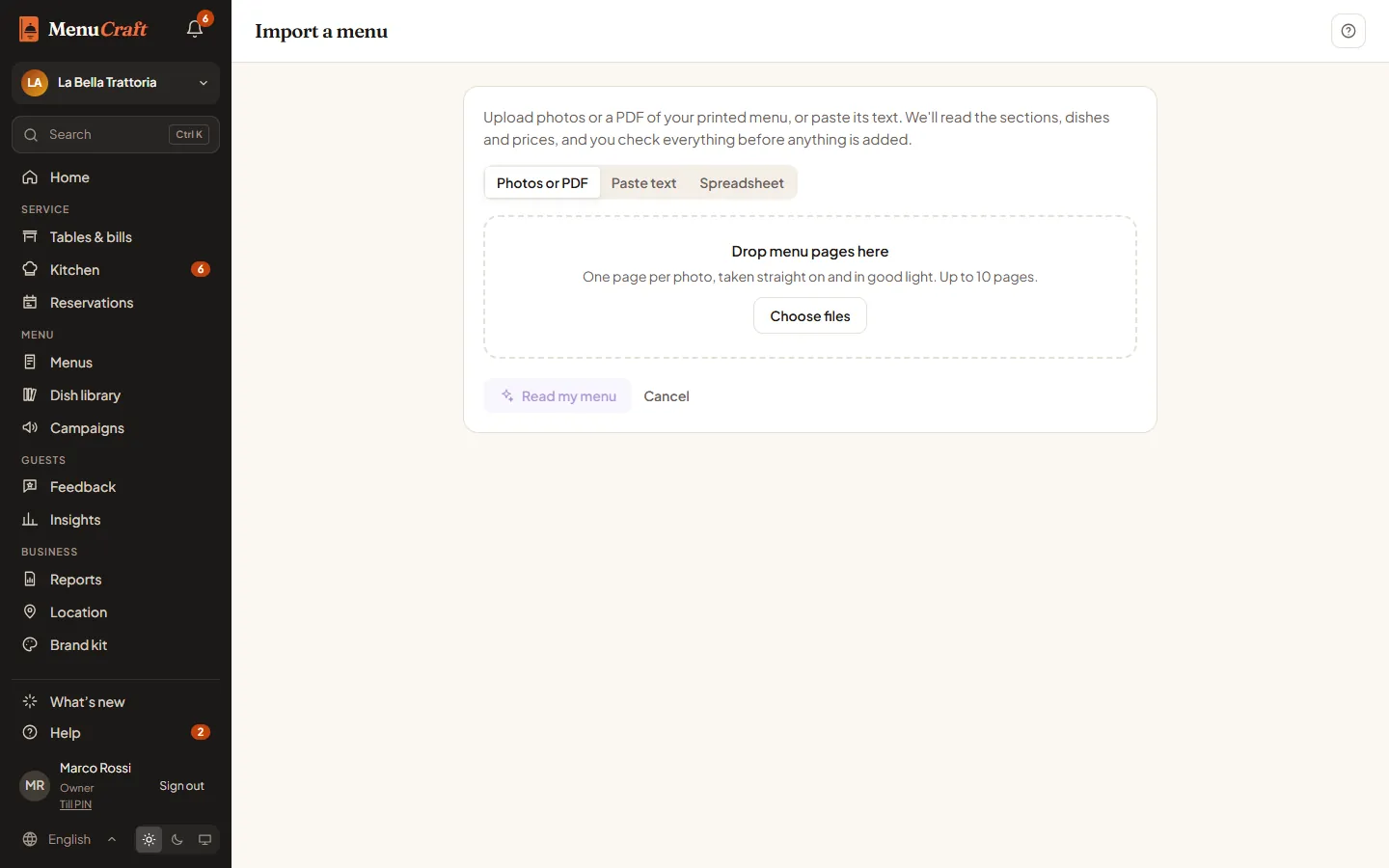
Side-by-side comparison
What changes when you replace a PDF link with MenuCraft.
PDFs are great for printers, not for a guest's phone screen at the table.
| What matters | Static PDF behind a QR code | MenuCraft live digital menu |
|---|---|---|
| Reading on a phone | Guests pinch, zoom, and pan across tiny multi-column pages | Laid out like a crafted carte for phones; opens instantly in the browser |
| Price changes & sell-outs | Open design software, export a new PDF, re-upload, and hope the link stays the same | Change a price or mark a dish sold out in one tap from your phone; table QR codes never change |
| Guest languages | One language per PDF file, or cluttered dual-language lines | Up to 14 languages on one menu, including right-to-left Arabic, switched in one tap |
| Allergens & dietary filters | Tiny footnotes at the bottom of the page with no way to filter | Guests filter by Vegan, Vegetarian, Gluten-Free, Halal, or allergens in their own language |
| At the table | A static document with no connection to your team | Optional waiter call, bill request, table ordering, and kitchen screen tickets |
| Google & AI search visibility | Dishes and prices are locked inside a binary file | Published with Schema.org Menu and MenuItem structured data for Google and AI assistants |
From PDF to live menu
Keep your existing PDF as your starting point.
You don't need to retype your menu from scratch. Upload your PDF or snap a photo of your printed carte, review every dish and allergen, and publish when it's right.
- Upload a PDF or photos of your paper menu; sections, dishes, descriptions, and prices are extracted for you
- You review and confirm every dish and allergen on a clear approval screen before anything goes live
- Print updated paper menus and table tents straight from MenuCraft whenever you need physical copies
- Start on the Free plan with no credit card and no hardware required
Solutions and comparisons
MenuCraft for every kind of hospitality.
QR Menus for Cafés & Bakeries
Beautiful QR menus for cafés, coffee shops, and bakeries: drink sizes, milk and syrup add-ons, instant pastry sell-outs, Wi-Fi sharing, and a pickup number board.
Explore For restaurants & bistrosQR Menus & Ordering for Restaurants
Crafted multilingual QR menus for independent restaurants and bistros, with table ordering, waiter calls, kitchen screen, reservations, and table bills.
Explore For hotels & resortsQR Menus for Hotels & Room Service
Digital QR menus in 14 languages for hotels, resorts, and room service. Manage room service, pool bar, and restaurant menus with room-tagged QR codes.
Explore 14 languages · Right-to-left Arabic14-Language AI Menu Translation
Translate your restaurant or café QR menu into 14 languages—including proper right-to-left Arabic, German, French, Russian, and Chinese—while keeping full editorial control.
Explore Table ordering · Kitchen screenQR Table Ordering & Kitchen Screen
Let guests order from the table, call a waiter, or ask for the bill via signed QR codes. Orders appear live on your kitchen screen or WhatsApp with 0% commission.
Explore Table bills · Shared tillTable Bills (Adisyon) & Shared Till
Run open table bills (adisyon) from table to till: merge guest QR orders and waiter orders on one tab, split bills 2–10 ways, and close the day with a cash count.
Explore Photo to menu · Ready in 60 secondsPhoto & PDF to QR Menu
Turn photos of your printed paper menu, a PDF, or an Excel spreadsheet into a live multilingual QR menu in 60 seconds. Review every dish and allergen before publishing.
Explore Transparent menus · Allergens & nutritionAllergens, Calories & Transparent Menus
Display all 14 standard food allergens, ingredients, calories (kcal), prep times, and interactive Vegan, Gluten-Free, and Halal filters across 14 languages.
Explore Kitchen screen (KDS) · Pickup boardKitchen Screen (KDS) & Order Board
Replace paper tickets with a live browser-based Kitchen Display System (KDS) and a TV pickup order board. Included on every MenuCraft plan, even Free.
Explore Regulatory compliance · Transparent menusTurkish Menu Regulation & Price List Compliance
Full compliance with Turkey's Ministry of Trade Price Label and Ministry of Agriculture Food Labelling regulations: 14 allergens, ingredients, calories, and print-ready price lists.
ExploreQuestions
Frequently asked questions
Can't find your answer here? Look it up in the help center or write to us. Once you've signed up, you can also ask from inside the app.
Can I import my current PDF menu into MenuCraft?
Yes. Drop your PDF file or photos of your paper menu into MenuCraft. The AI reads the sections, dish names, descriptions, and prices, and places them on a review screen where you approve everything before adding it.
Do I have to reprint my QR codes when I update prices?
Never. Your MenuCraft QR code points to your live menu. When you publish a price change or mark a dish sold out, guests see the update immediately from the same QR code.
Can I still print a paper or PDF menu when I need one?
Yes. MenuCraft's print studio formats your live menu into a clean, print-ready PDF carte, as well as QR table tents, posters, and stickers.
Do guests need to download an app to read the menu?
No. The menu opens directly in the phone's browser with zero third-party trackers, cookies, or app downloads.

Have your menu ready tonight.
No credit card, no hardware. Take the photo and leave the rest to MenuCraft.
No credit card · No setup fee · No hardware · Cancel any time